AI Legal Toolbox. Review, advise, automate.
Built in Australia, for Australian practices

One lawyer,
working like twelve.

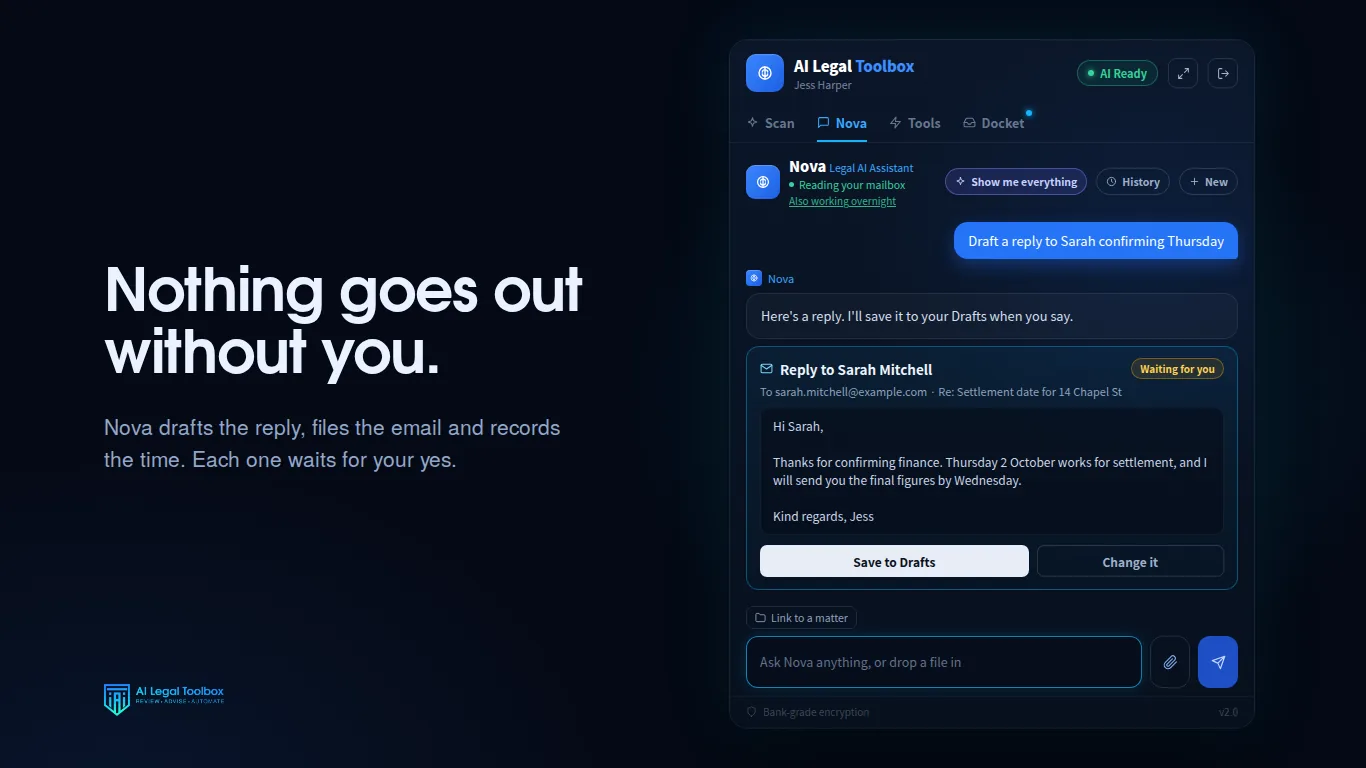
Nova is an AI paralegal that lives inside Outlook. She reads the matter in front of you, works out what it needs, and has the reply, the file note, the time record and the diary entry ready before you have finished your coffee.

  • Three days free, on your real matters
  • Nothing sends without your tap
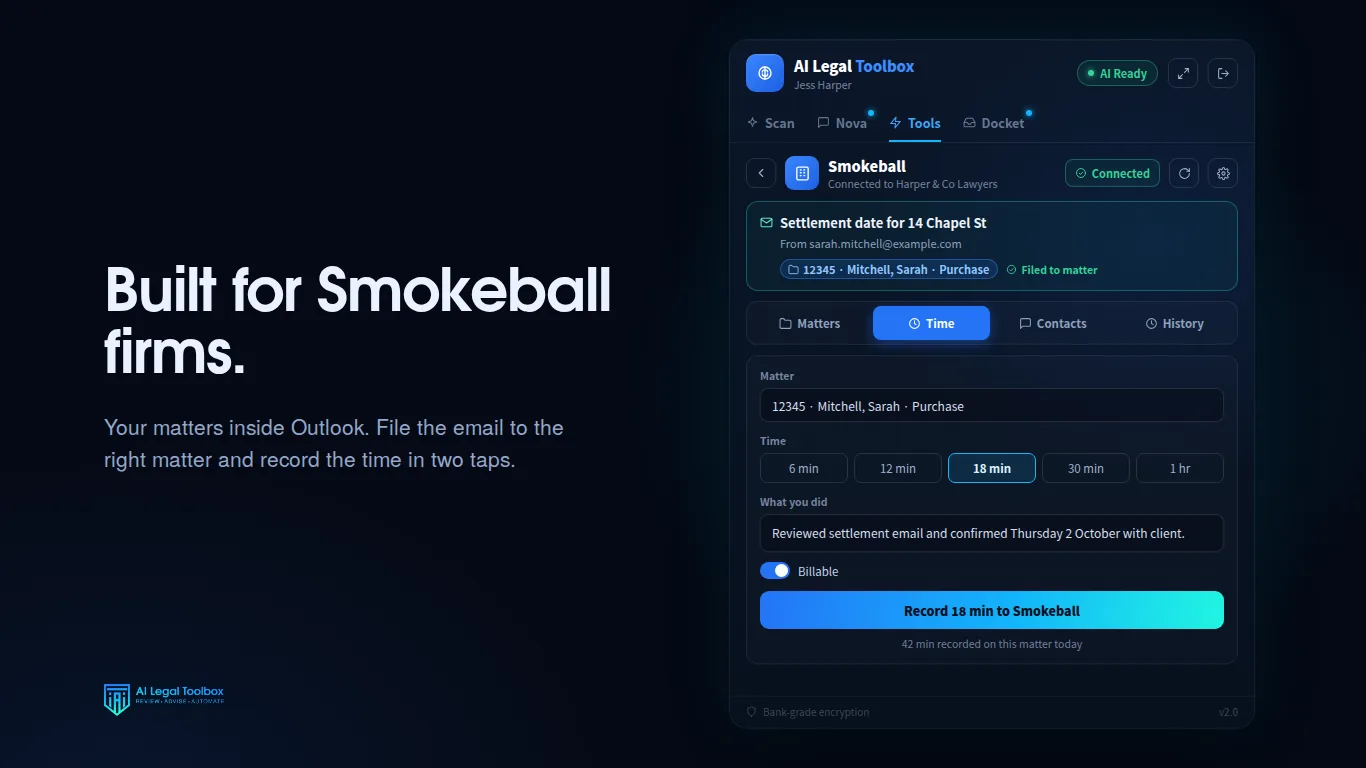
  • Smokeball connected

Review. Advise. Automate.

Three things a practice does all day. Scroll, and watch her do each one.

01

She reads before you do

Every message is read against your open matters and sorted into what needs you now, what needs you this week, and what can wait. Attachments are read too. A scanned contract, a photographed signature page, a spreadsheet of adjustments.

02

She tells you what she found

A plain assessment of what the message needs and why it matters, in Australian legal context. Where she is not certain she says so. Where no matter fits, she flags it rather than filing it somewhere plausible.

03

She has the work ready

The reply is drafted in your register. The time is calculated. The matter is identified, the diary entry written, the letter generated on your letterhead. All of it waits on one tap.

Docket14 read, 3 need you
Needs you now3
Settlement booking, 14 Chapel StMitchell
Building and pest, condition expiringCoastal
Costs agreement not returnedGreggo
This week6
Rates certificate receivedMitchell
Executor identificationBrown
Later5
Law Society newsletterNo matter
Needs you nowCoastal Builders · Litigation

The building and pest condition falls due on 19 September. The report attached identifies rectification the buyer has not accepted. No extension has been requested and nothing has gone back to the other side.

Two matters could fit this sender. Flagged rather than guessed.
Draft replyIn your drafts, in your register
Confirm
Record 0.4 unitsCoastal Builders, Litigation General
Confirm
File to matterWith the building and pest report
Confirm
Three actions prepared. None of them have happened yet.

She prepares. You approve.

Every product like this asks a practice to trust it. These are enforced in the software, not promised in a brochure.

The approval gate

Nothing leaves without your tap

Replies are written into your drafts folder. Filing, time records and diary entries show you exactly what is about to happen and wait for you to confirm. There is no code path in the product that sends an email to a client, a court or another practitioner on your behalf. The send function was deleted, not disabled.

PendingYou confirmExecuted and logged
Honesty

She says when she does not know

Ask about a document she has not been given and she tells you she cannot see it, rather than producing a convincing summary of something that does not exist.

Audit

A record of everything

Every approved action is written to an activity log. What was done, to which matter, when, and what it produced. Visible in the pane, not buried in an export.

Overnight, if you allow it

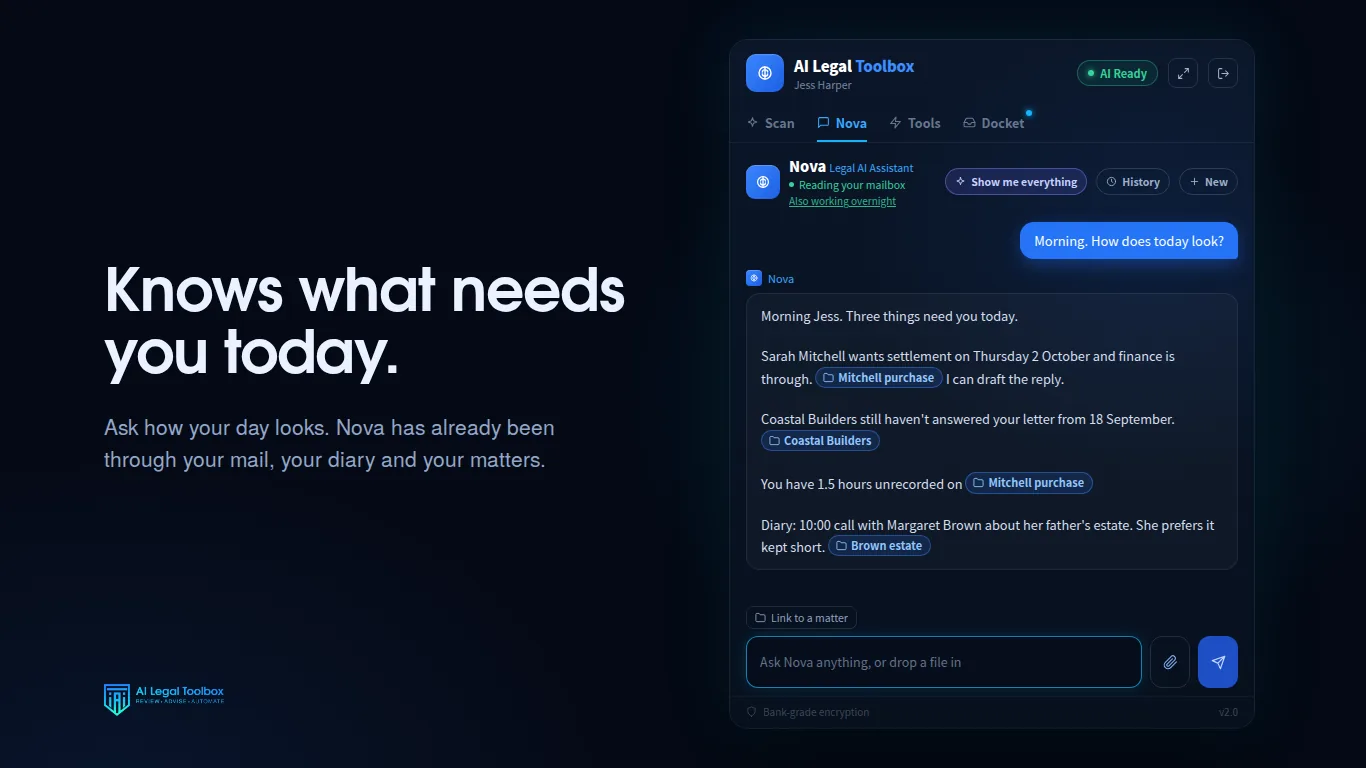
The queue is ready before you are

Switch it on and triage keeps running with Outlook closed, so the desk is already sorted when you walk in. It only runs for practitioners who have granted it, and it stops the moment you say so.

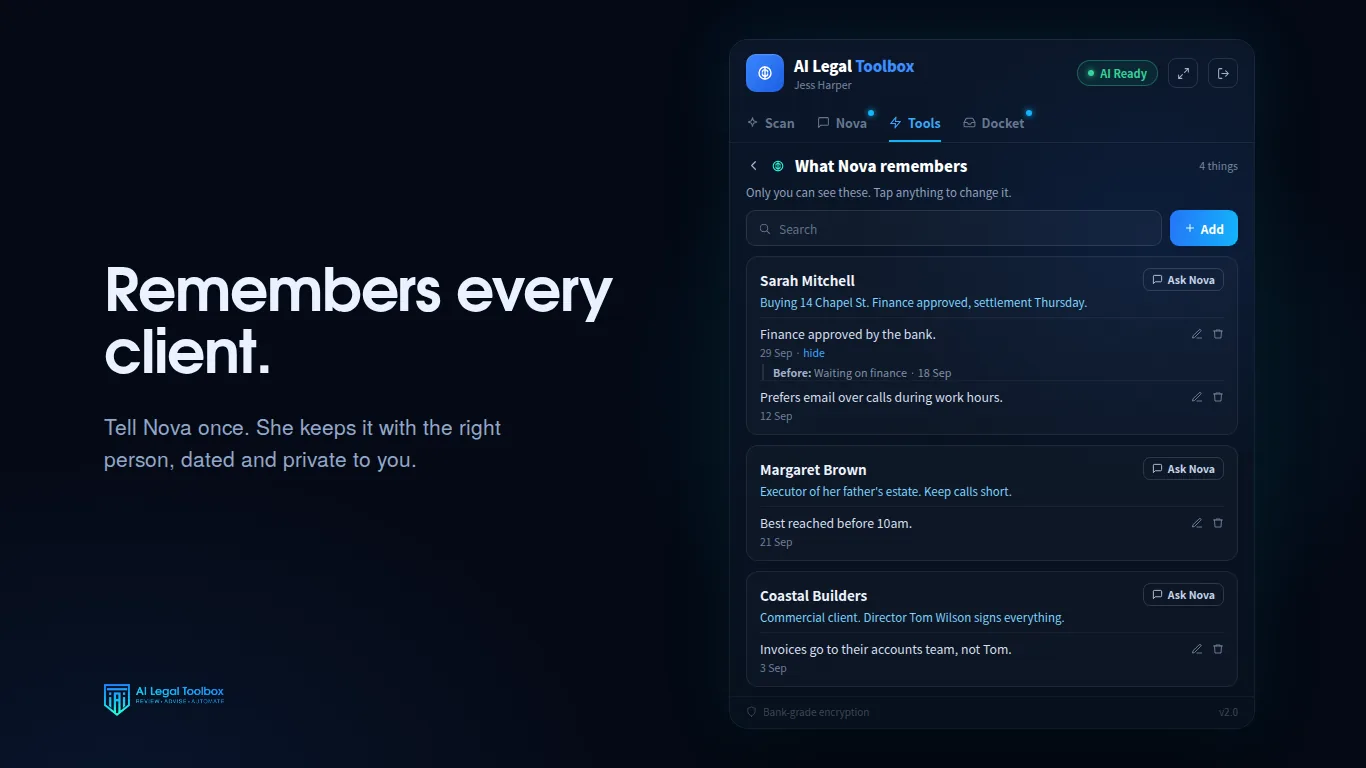
Memory

A conversation per matter

Pin a thread to a file and it stays. She knows what the matter is about, what has been filed to it and what has been billed, so you are not briefing her again each morning.

Your voice

It reads like you wrote it

She learns from correspondence you have already approved, so a letter comes back in your register rather than in generic AI English. Your firm name, address, ABN, trust account and practitioner details are injected into every document, so letters arrive with no placeholder brackets left in them.

The rest of the toolbox

The Docket is the front door. Behind it sits the work a paralegal would otherwise be doing by hand.

Email IntelligenceDetects the intent, the urgency and what the message actually asks of you.
Draft AI ReplyA context-aware reply into your drafts folder, never into someone's inbox.
Legal AnalysisDocument analysis, client memos, contract review and legal research.
Voice MatchingTrains on correspondence you have already sent so replies read like you.
AI Writing StyleSet the tone and register Nova writes in for your practice.
Email CategoriesCategorises the inbox by matter, client and priority.
Document ToolsReads PDFs, Word files, spreadsheets, images and scans, and pulls the text out.
Calendar and MeetingsUpcoming meetings and court dates, with entries written once you approve them.
Smokeball CRMMatters, contacts, filing and time entries, in both directions.
Usage and AnalyticsWhat was used, what was produced, and where the time went.

Everything above runs against the material you give her. Nothing is invented to fill a gap.

Ask in plain English

No commands, no syntax. Every line below works word for word.

What do I need to do?
A ranked queue of what is outstanding, with the work already prepared
Who am I keeping waiting?
The people who have written to you and not had a reply
Draft a reply to this
A reply in your register, in your drafts, for you to edit and send
Diarise settlement for the Mitchell matter on 26 September
A calendar entry, shown to you before it is created
Anything in my sent items that should have been billed?
Work you have done and not recorded
Summarise this contract and tell me what is unusual
The substance, plus the clauses that differ from what you would expect
Write the letter of demand and put it on our letterhead
A Word document with your firm details already in it
What is the state of the Coastal file?
What is filed, what is billed, and what is still open on it

Built for people who hold client confidences

A practice cannot adopt software on a leap of faith. Here is the position, stated plainly.

Your correspondence trains nothing

Client material is never used to train or improve a general purpose AI model, and our agreement with our model provider excludes it.

Access you grant and can revoke

Mailbox access is granted through your own Microsoft account and withdrawn there at any time, without touching anything else.

Tokens encrypted, actions logged

Authorisation tokens are encrypted at rest, no long-lived credential sits in your browser, and everything that changes something is recorded.

Where your data sits

Our privacy policy states exactly where correspondence is processed today and what is changing. Read it before you sign up, particularly if your practice has offshore requirements.

One price. No tiers.

$149per practitioner
per month

Australian dollars, including GST. No setup fee, no minimum term.

  • Three days free, on your own real matters
  • The whole toolbox, not a starter tier
  • Practice management integration
  • Cancel before the trial ends and you are not charged
Request a trial

Questions a principal asks

Can it send an email without me seeing it?

No. Replies are written into your drafts folder for you to read, edit and send yourself. There is no path in the product that sends correspondence on your behalf.

What happens when it gets something wrong?

It will, occasionally, as any AI system does. That is why filing, billing and diarising each require you to confirm before anything happens, and why drafts land in your drafts folder rather than in someone's inbox. Where it names a case or a section, check it in your usual research source before you rely on it.

Do I have to change how the practice works?

No. It lives in the Outlook you already use, beside the email you are already reading. There is nothing new to log into and no separate system to keep up to date.

Which practice management systems does it work with?

Smokeball today. It still works without one, you simply lose the filing and time recording against matters.

Is my client information used to train an AI?

No. Your correspondence is not used to train or improve any general purpose model.

How long does it take to set up?

It installs as an Outlook add-in and signs in with your Microsoft account. Connecting a practice management system is one authorisation. There is no migration and no data import.

What happens to our data if we leave?

Stop the subscription and we delete the stored data within 90 days, other than what we must keep for tax or legal reasons. You can clear conversation history from inside the product at any time.

See it on your own matters

We would rather show you the product against your own correspondence than send you a deck. A walkthrough takes about twenty minutes, and the trial starts the same day.

hello@ailegaltoolbox.com.au